
Table of Content
Introduction
You’ve launched your website, written blog posts, and maybe even shared them on social media—but your site still isn’t showing up on Google. Sounds familiar?
This is a very common issue, especially for beginners. Many people assume that once a website is live, it will automatically start ranking. But in reality, Google ranking is a process that depends on multiple factors like content quality, SEO optimization, and website authority.
If your website is not ranking, it doesn’t mean you’ve failed—it simply means something needs to be fixed. In this guide, we’ll break down the real reasons behind this problem and give you a clear, step-by-step solution you can apply immediately.
👉 Get a Free Website Audit today from WebZonic Agency and discover why your website is not ranking on Google.
What Does “Website Not Ranking” Mean?
When we say a website is not ranking, it can mean different things:
- Your site does not appear in Google search results at all
- Your pages are not indexed by Google
- Your rankings are very low (page 5 or beyond)
This issue is often called a website ranking issue or SEO ranking problem. It can happen due to technical errors, poor keyword targeting, or lack of authority.
For example, you may have written a great article, but if Google hasn’t indexed it or doesn’t trust your website yet, it won’t rank.
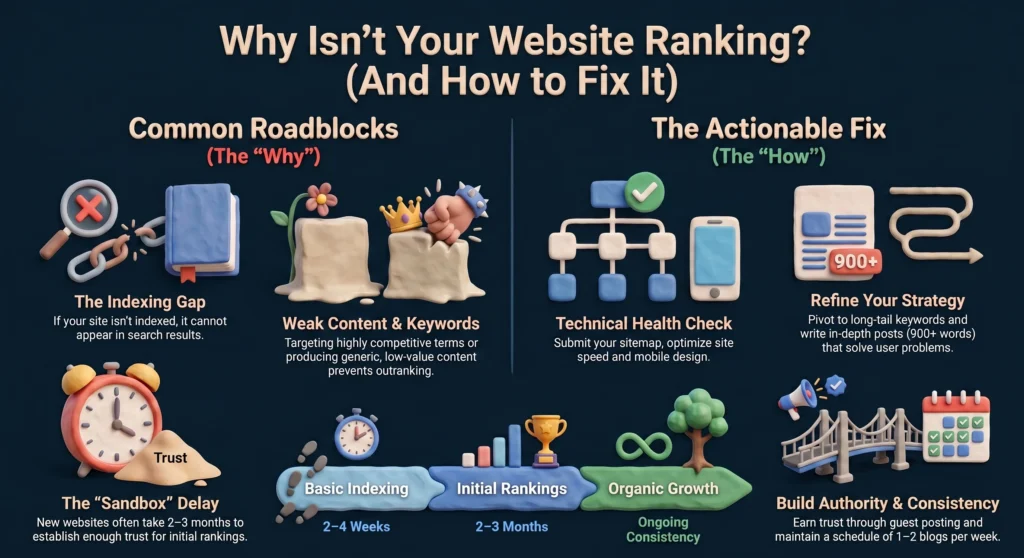
Top Reasons Your Website is Not Ranking
-
Your Website is Not Indexed
Indexing is the first step. If your site isn’t indexed, it simply won’t appear on Google.
Example:
You publish 10 blog posts, but when you search site:yourdomain.com, nothing shows up.
How to fix it:
- Submit your website to Google Search Console
- Add and submit your sitemap
- Check robots.txt and noindex tags
-
Poor Keyword Strategy
Many beginners target the wrong keywords. This is one of the biggest reasons for a site not ranking on Google.
You might be targeting:
- Highly competitive keywords
- Keywords with no search volume
- Irrelevant topics
Real-life example:
A new blog trying to rank for “digital marketing” instead of “digital marketing tips for beginners”.
-
Low-Quality Content
Google prioritizes helpful, original, and in-depth content.
If your content:
- Is too short
- Lacks value
- Feels generic
…it won’t rank.
👉 Always aim to solve a real problem instead of just filling words.
-
No Backlinks (Low Authority)
Backlinks are one of the strongest ranking factors.
Without backlinks:
- Google doesn’t trust your site
- Your authority remains low
- Competitors outrank you easily
-
Technical SEO Problems
Even great content can fail if your website has technical issues such as:
- Slow loading speed
- Poor mobile design
- Broken links
- Bad URL structure
These issues directly affect your rankings and user experience.
-
Your Website is New
New websites often go through a “sandbox phase,” where Google takes time to trust and rank them.
This can take:
- 2–4 weeks (basic indexing)
- 2–3 months (initial rankings)
Step-by-Step Fix (Actionable Checklist)
Here’s a practical plan you can follow today to fix your SEO ranking problem:
1: Check Indexing
- Search site:yourdomain.com
- If pages are missing → submit sitemap in Google Search Console
2: Fix Your Content Strategy
- Use long-tail keywords
- Write detailed blog posts (900+ words)
- Focus on solving user problems
3: Optimize On-Page SEO
- Include keyword in title, URL, headings
- Add meta descriptions
- Use internal linking between pages
4: Improve Website Speed
- Compress images
- Use caching plugins
- Choose fast hosting
5: Build Backlinks
- Guest posting
- Directory submissions
- Social media sharing
6: Stay Consistent
- Publish 1–2 blogs per week
- Update old content regularly
💡 For deeper learning, check this guide:
Complete SEO Guide for Beginners (2026) – Step-by-Step
Real Results (Testimonials)
“After implementing these SEO strategies, our organic traffic increased by 65% within just one month. The results were better than we expected.” – Hassan Ali
“We were struggling with a serious website ranking issue, but within 5 weeks, our main keywords started ranking on Google’s first page.” – Ayesha Malik
“Our website was not ranking at all in the beginning. However, after fixing technical SEO and improving content, more than 75% of our pages got indexed.” – Usman Tariq
Common Mistakes to Avoid
If your website is not ranking, avoid these mistakes:
- ❌ Ignoring keyword research
- ❌ Writing low-quality content
- ❌ Not submitting sitemap
- ❌ Keyword stuffing
- ❌ Ignoring mobile optimization
People Also Ask (PAA)
Why is my website not ranking?
Your website may not rank due to indexing issues, weak SEO strategy, poor content, or lack of backlinks.
What are the 4 types of SEO?
- On-page SEO
- Off-page SEO
- Technical SEO
- Local SEO
Is SEO dead or evolving in 2026?
SEO is evolving, not dead. Google now focuses on user intent, helpful content, and authority.
What does it mean if a site is not indexed?
It means Google hasn’t added your pages to its database, so they won’t appear in search results.
Can I pay Google to rank my website higher?
No, organic rankings cannot be bought. However, Google Ads can provide paid visibility.
Conclusion
If your website is not ranking, don’t panic. This is a common issue, especially for new websites.
Focus on:
- High-quality content
- Strong SEO foundation
- Consistent effort
SEO is a long-term game, but once it works, the results are powerful.
👉 If you want faster results, WebZonic Agency offers professional SEO services to help your website rank higher, drive traffic, and grow your business.
Author Bio
Written by Muhammad Taha, an SEO Specialist at WebZonic Agency, who helps businesses grow their online presence through effective SEO and digital marketing strategies. With a results-driven approach, he not only focuses on improving search rankings but also ensures long-term growth and visibility. Additionally, his expertise allows brands to attract the right audience and convert traffic into real business results.
2 Responses
Yes newly website is not ranking because of these issues. Agree with this!
Nice! Such a helpful guide….Keep it up